Demos

Working AI workflows, not slideware

Each demo is a small, real system built in Go on AWS for one specific kind of company and one manual workflow that slows it down. They run on synthetic data, keep a human in the loop wherever the model is unsure, and log every automated decision with the reasoning behind it.

Why not n8n?

Short answer: for a lot of workflows, n8n — or Zapier, or Make — is the right call, no argument there. If you're gluing two SaaS tools together, running a handful of times a day, and nobody on the team writes code, a visual no-code workflow ships faster and costs less to maintain than anything custom.

These demos are built for a different shape of problem: workflows with real branching logic, human-review gates, audit requirements, or volume that scales past what per-execution pricing handles gracefully. Northfen's render-farm anomaly detector, for example, streams and scores metrics continuously and runs about $11/month in AWS costs at its current volume — a number that stays low because the architecture (Lambda, Kinesis, DynamoDB) only costs money while it's actually doing work, and scales linearly instead of hitting a plan-tier wall. A no-code tool's per-execution pricing can get expensive fast once you're past a few thousand events a day and need conditional logic, retries, and an audit trail that visual builders weren't really designed for.

The honest version: no-code is the pragmatic choice for low-volume glue-work. Custom Go on AWS wins when the logic is complex, the audit trail matters, or the volume is real. Which one's right depends on your actual workflow — happy to talk through where that line falls for yours.

Live demo

Support ticket triage: Ingest → Classify → Route

Recorded from the live demo: a data-loss ticket is classified critical and routed straight to the incident queue, while the tickets the model is unsure about wait for a person.

Built for: B2B SaaS companies whose support tickets land in one shared inbox that a small team sorts by hand — the step that breaks first as volume grows.

The scenario: Rivergate Technologies is a fictional 450-person project-management SaaS company. Tickets arrive by email, chat, and a web form. Every ticket, customer, and company in the demo is synthetic.

1. Ingest

Email, chat, and web-form tickets are normalized into one shape and queued.

2. Classify

One bounded model call (Claude on Amazon Bedrock) returns a category, priority, short summary, and a confidence score.

3. Route

Configurable rules decide what happens: outages page on-call and open an engineering ticket; confident billing, bug, feature, and how-to tickets go straight to the right queue.

4. Review

Anything the model is unsure about goes to a human review queue with approve / override — low confidence never auto-routes.

Why it holds up in production

  • Full audit trail for every ticket: what the model said, which rule fired, and why each action was taken
  • Rules and prompt live in config, so the same pipeline is re-pointed at a new company in hours, not weeks
  • MCP tools let an AI agent operate the pipeline — read access by default, write access opt-in per tool

Try it in two minutes

  1. Pick an example ticket — or write your own messy one
  2. Watch it get classified and routed in a few seconds
  3. Open the review queue and approve or override the model
GoAWS LambdaSQSS3DynamoDBAPI GatewayAmazon BedrockAWS SAMMCP
Launch the live demo →Request the access passwordView the code on GitHub ↗

The live demo is password-protected because it runs real model calls. Ask me for access — I'm happy to walk you through it, or to show how it would look re-pointed at your own workflow.
Live demo

Production handoff triage: Ingest → Classify → Route

Recorded from the live demo: the model finds the blocker buried in an upbeat artist note, the shot is escalated instead of advanced, and a supervisor signs off.

Built for: Animation and production studios where a coordinator manually checks every shot handoff by hand — the step that breaks first as a show scales up.

The scenario: Amberlight Animation is a fictional 280-person episodic animation studio. Shots move through storyboard, layout, animation, lighting, and compositing. Every shot, artist, and show in the demo is synthetic.

1. Ingest

A shot handoff — its ID, current stage, artist, and notes — is normalized and queued.

2. Classify

One bounded model call (Claude on Amazon Bedrock) reads the artist's notes and returns a readiness verdict — ready, needs revision, or blocked — with reasoning and a confidence score. It does not decide what the next stage is; that's fixed, known sequencing, not a judgment call.

3. Route

The next stage is looked up from a configured pipeline order, not guessed by the model. Blocked shots always escalate to a supervisor; anything the model isn't confident about goes to a coordinator; confident, ready shots auto-advance to the next stage's queue; shots needing revision go back to the artist with the reasoning attached.

4. Review

Anything the model is unsure about goes to a human review queue with approve / override — low confidence never auto-advances.

Why it holds up in production

  • Full audit trail for every handoff: what the model said, which rule fired, current stage and next stage
  • Same pipeline, second industry: this is the identical underlying system that runs the support-ticket demo, re-pointed at animation production by changing only the prompt, the routing rules, and the pipeline's stage order
  • MCP tools let an AI agent operate the pipeline — read access by default, write access opt-in per tool

Try it in two minutes

  1. Pick an example shot handoff — or write your own coordinator note
  2. Watch it get classified and routed in a few seconds
  3. Open the review queue and approve or override the model
GoAWS LambdaSQSS3DynamoDBAPI GatewayAmazon BedrockAWS SAMMCP
Launch the live demo →Request the access passwordView the code on GitHub ↗

The live demo is password-protected because it runs real model calls. Ask me for access — I'm happy to walk you through it, or to show how it would look re-pointed at your own workflow.

Live demo

Render farm anomaly diagnosis: Stream → Detect → Explain → Dispatch

Recorded from the live demo, sped up: one node's frame times creep up after a driver update, plain statistics flag it, one model call explains it, and on-call acknowledges the ticket.

Built for: Animation and VFX studios whose render farm has to turn every day's work into frames by morning, where monitoring already spots that something is off but working out why still needs a senior render wrangler, and the 2am on-call wrangler usually isn't one.

The scenario: Northfen Studios is a fictional 250-person animation and VFX studio in the middle of a season-2 capacity push: new render nodes, a new compositing pool, and new driver images rolling out. Lighting, FX and compositing pools stream frame times, GPU and CPU temperature, memory, storage latency, failed frames and license waits. Every pool, node and metric in the demo is synthetic.

1. Stream

Render-farm metrics stream through Amazon Kinesis tick by tick. In the demo you pick a scenario and watch about 50 seconds of a night on the farm arrive live.

2. Detect

Plain statistics, no model: each metric learns its own normal, then rolling EWMA / z-score rules flag spikes, sustained excursions and slow drift. A frozen or silent metric is flagged as a monitoring fault. Every window is scored and stored, and metrics that move together on one render pool are grouped into one incident.

3. Explain

Only after something is flagged, one bounded model call (Claude on Amazon Bedrock) reads every metric on that pool plus its recent changes and incidents, and returns ranked likely causes (a bad node, a driver roll-out, a heavy asset publish, shared storage), what to check first, a severity and a confidence score. It diagnoses infrastructure only: it never decides whether something is anomalous, and never judges the work.

4. Dispatch

A fixed table, not the model, turns severity and confidence into log, ticket or page. Explanations the model isn't sure about go to a human instead of being dismissed. On-call can acknowledge, escalate or dismiss with a note.

Why it holds up in production

  • Detection is 100% deterministic and unit-tested: the model is called only on already-flagged windows, so a quiet night costs nothing and false alarms can't be talked into existence
  • Operations, not art: the model reads infrastructure metrics and is instructed never to comment on the creative content or quality of any shot
  • Full audit trail for every alert: the detector rule and z-score, exactly what the model was shown, its answer, which dispatch rule fired, and who acknowledged it
  • Works alongside the render manager the studio already runs (AWS Deadline Cloud, Deadline 10, Tractor, OpenCue): it watches the farm's infrastructure, not the job queue, and can replay history in Deadline Cloud's own export format
  • MCP tools let an AI agent work the anomaly feed. Read access is on by default and write access is opt-in per tool; no tool can change a threshold or pick the action

Try it in two minutes

  1. Pick a scenario: a normal night, a node slowing after a driver update, a burst of failed frames, a frozen license monitor, the whole pool slowing down at once, or a night replayed from a Deadline Cloud export
  2. Watch the metrics stream in and the windows get scored live. Normal scenarios should stay quiet
  3. When something flags, read the diagnosis, then acknowledge, escalate or dismiss it
GoAmazon KinesisAWS LambdaDynamoDBSQSSNSAPI GatewayAmazon BedrockAWS SAMMCP
Launch the live demo →Request the access passwordView the code on GitHub ↗

The live demo is password-protected because it runs real model calls. Ask me for access — I'm happy to walk you through it, or to show how it would look re-pointed at your own workflow.

Live demo

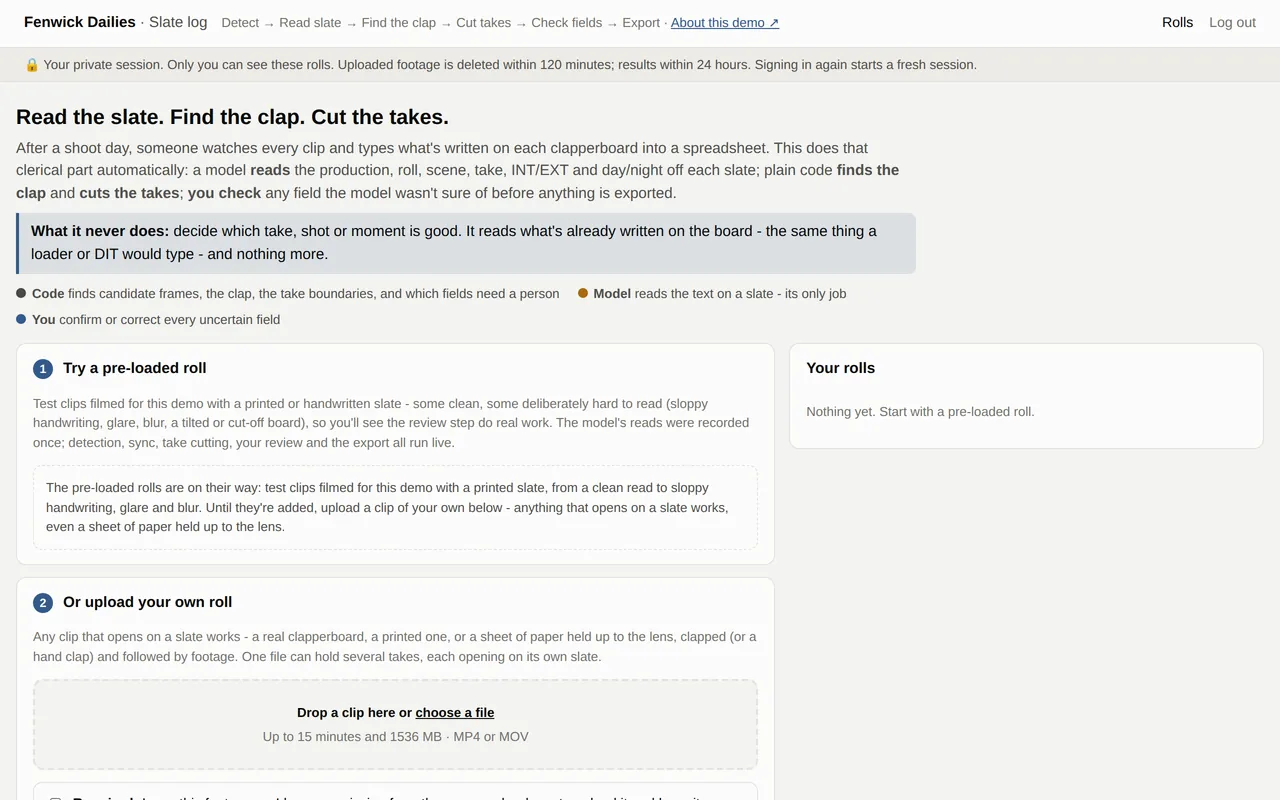
Dailies slate logging: Detect → Read → Sync → Review

Screenshot: Dailies slate logging: Detect → Read → Sync → Review
The live demo's start page. Upload a clip that opens on a slate and it reads the board, finds the clap and cuts the takes.

Built for: On-set data-wrangling and DIT houses serving independent film and TV, where after every shoot day someone watches each clip and types what's written on its clapperboard into a spreadsheet.

The scenario: Fenwick Dailies is a fictional 16-person DIT house that turns raw camera and sound into searchable, editorial-ready dailies. This demo takes real footage: try a pre-loaded roll, or upload up to 15 minutes of your own with a slate at the head of each take (a printed sheet held up to the lens works).

1. Detect

Your upload goes to private storage and is checked three times for size and length. Plain code measures every frame and the sound, and picks out the few frames that might show a slate: a steady, detailed hold. Amazon Rekognition moderates sampled frames, and every one of those candidate frames, before any AI call.

2. Read

One bounded multimodal call per candidate frame (Claude on Amazon Bedrock) answers one question: is a slate in this frame, and what is written on it? Production, roll, scene, take, INT/EXT and day/night each come back with their own confidence. Reading the board is the only thing the model does.

3. Sync

The sync point is found by signal processing, not AI: a sharp rise in the sound matched to the frame where the sticks snap shut. Take boundaries are fixed rules on the slate times, snapped to whole frames.

4. Review

Any field read below its confidence threshold, or that breaks a rule (a take that isn't a number, a roll that differs from the rest of the file), is shown next to a crop of the actual slate for a person to confirm or correct. Nothing is guessed. Then ffmpeg cuts each take and writes a JSON and CSV manifest.

Why it holds up in production

  • It reads, it doesn't judge: the model transcribes what's written on the board, the same thing a loader or DIT would type. It never decides which take, shot or moment is good; that stays with the editor
  • Only one step uses AI. Candidate detection, clap sync, take boundaries and the review rules are deterministic Go with heavy unit tests, so the same footage always cuts the same way
  • Uncertainty goes to a person, not a guess: low-confidence or rule-breaking fields block export until someone checks them against the slate, and the manifest records who confirmed or corrected what
  • Built for real uploads from strangers: a required rights confirmation, 15-minute and 1.5 GB limits, moderation before any AI call, per-session rate limits, raw footage deleted within 2 hours, and usage alarms that switch uploads off on their own
  • MCP tools let an AI agent work the review queue. Read access is on by default and write access is opt-in per tool; no tool can dismiss a slate, move a cut or export an unchecked field

Try it in two minutes

  1. Run a pre-loaded roll, or upload a clip that opens on a slate
  2. See the roll's timeline: which frames the detector picked, what the model read, where each clap is and where each take is cut
  3. Confirm or correct the fields the model was unsure of, then export the takes and the manifest
GoAWS Step FunctionsAmazon RekognitionAmazon BedrockAWS LambdaffmpegS3DynamoDBAWS SAMMCP
Launch the live demo →Request the access passwordView the code on GitHub ↗

The live demo is password-protected because it runs real model calls. Ask me for access — I'm happy to walk you through it, or to show how it would look re-pointed at your own workflow.

Live demo

Rights clearance research: Trace → Stop → Check → Decide

Recorded from a local run that replays a real model investigation: the agent finds an undeclared 1978 interpolation, traces its owner, and the fixed rules recommend clear for a coordinator to sign off.

Built for: Music supervision and content-clearance boutiques serving ad agencies and production companies, where a researcher has to trace who owns a track, and who owns whatever it samples, before a campaign can air.

The scenario: Corvid Sync is a fictional 14-person rights-clearance boutique. A client wants a track for a campaign, in certain territories and channels, for a set term. This is the one demo here where the AI decides the sequence of steps itself: it can't know how many owners it will need to trace until it finds a sample and starts pulling the thread. Every track, owner, license and client is synthetic.

1. Trace

An AI agent (Claude on Amazon Bedrock, using native tool calling in a loop written in Go) picks one lookup at a time based on what the last one showed: the license library, the owners of the recording and the song, sample detection, territory and usage coverage, and prior precedent. When it finds a sample, it goes and traces that record's owners too. Every tool it has is read-only.

2. Stop

The agent stops when it has what it needs, or at a hard limit of 8 tool calls. A chain of samples too deep to finish is marked incomplete and handed to a person, along with what the agent still wanted to check. It is never asked to guess a conclusion.

3. Check

Plain code, not the model, re-reads the evidence. Any owner it couldn't identify, territory or use not covered, check the agent skipped, or matching refusal on file sends the request to a person. The agent's own opinion can make the result stricter, never looser.

4. Decide

A rights coordinator reads the whole trail and the rules' verdict, then approves (with conditions) or denies. That is the only place anything is actually cleared.

Why it holds up in production

  • It researches, it doesn't decide: the agent looks things up and reports what it found. Whether a track is cleared is decided by fixed rules and then by a person, never by the model
  • The agent chooses its own next step inside hard walls: six read-only lookups (read-only down to the database permissions), an 8-call cap and a time limit. Tests prove the tool set can't write and the cap can't be exceeded
  • The rules trust evidence, not prose: they recompute every work in scope from the recorded lookups and fail anything unverified, so the agent can't talk its way to a clear
  • Full audit trail: every tool call with its input, its result and the agent's stated reason for it, laid out step by step with the branches it followed
  • MCP tools let an outside AI agent work the review queue. Read access is on by default; starting an investigation (it costs model calls) and approving or denying are opt-in per tool, budgeted and logged

Try it in two minutes

  1. Run an example: an in-house track that's already cleared, a hidden 1978 melody to trace, an owner nobody can find, a territory gap, a past refusal, or a chain of samples too deep for the cap
  2. Watch the trail build step by step: where the agent branched and why, then how the fixed rules judged its evidence
  3. Approve or deny as the coordinator, or write your own request for any track in the catalog
GoAmazon Bedrock (Converse tool use)AWS LambdaDynamoDBAPI GatewaySSM Parameter StoreCloudWatchAWS SAMMCP
Launch the live demo →Request the access passwordView the code on GitHub ↗

The live demo is password-protected because it runs real model calls. Ask me for access — I'm happy to walk you through it, or to show how it would look re-pointed at your own workflow.

Blender plugin

Lighting notes to light settings: Note → Interpret → Propose → Apply

Rendered in Blender with the plugin: a bare spot light, the same light with a physical snoot, then five gobos picked from the gallery.

Built for: Animation and VFX studios where lighting artists get notes in plain language ("snoot the key down, keep it warm") and translate every one of them into cone angles, blend and power by hand, shot after shot.

The scenario: Thornbury is a fictional lighting team. Unlike the other demos, this one is a Blender plugin you install and try on your own scene, with no password. Snoots, the gobo gallery and beam profiles work offline with no account; the notes assistant runs on a small backend you deploy to your own AWS account with one command.

1. Note

The artist types a note in Blender's light panel. Only the note and the selected light's own settings are sent; nothing else from the scene, and no images.

2. Interpret

One bounded model call (Claude on Amazon Bedrock, forced to a fixed tool schema) turns the note into proposed values for that light's controls. It refuses notes about placement or taste, like "move the key left" or "make it more cinematic".

3. Propose

Go code clamps every value to the ranges Blender actually accepts and reports each correction. The artist sees current and proposed values side by side, with a one-line reason and a confidence.

4. Apply

Nothing changes until the artist clicks Apply, and then it is one undo step. Rows can be unticked or edited first, or the whole proposal discarded. The outcome is logged either way.

Why it holds up in production

  • Nothing is ever applied automatically: the artist reviews a diff and applies it as one undo step, edits it, or discards it
  • The model only proposes the light's own controls, and Go code clamps them to Blender's real ranges, checked against five Blender releases from 4.2 to 5.2
  • Physical snoots (real geometry that resizes with the light) and a gallery of 24 gobos for people who would rather pick by eye than describe a look. Both work with no account or internet
  • Cost guardrails on the backend: hashed per-person keys, monthly caps, a global daily cap, a kill switch that trips on its own, and an audit trail of every note and outcome

Try it in two minutes

  1. Install the plugin in Blender 4.2 or newer and select a spot or area light
  2. Add a snoot or pick a gobo from the gallery; no setup needed
  3. For the notes assistant, run make self-host to deploy your own backend, then type a note like "snoot it down, keep it warm"
Blender (Python)GoAWS LambdaAPI GatewayDynamoDBAmazon BedrockSSM Parameter StoreCloudWatchAWS SAM
Get the plugin on GitHub ↗Talk about your pipeline

Free and open source. Snoots and gobos need nothing else; the notes assistant runs on your own AWS account, so its model calls go on your bill, not mine.